
Appearance
Discount Codes
Discount codes are promotional codes that customers enter at checkout to receive a discount on their booking - a flexible marketing tool for campaigns, partnerships, and customer retention.
Code types
There are two types of discount codes:
- Percentage - Deducts a percentage of the booking subtotal (e.g., 10% off).
- Fixed amount - Deducts a flat amount in your currency (e.g., €15.00 off).
How to create a discount code
- Navigate to Pricing > Discount Codes.
- Click Add Discount Code.
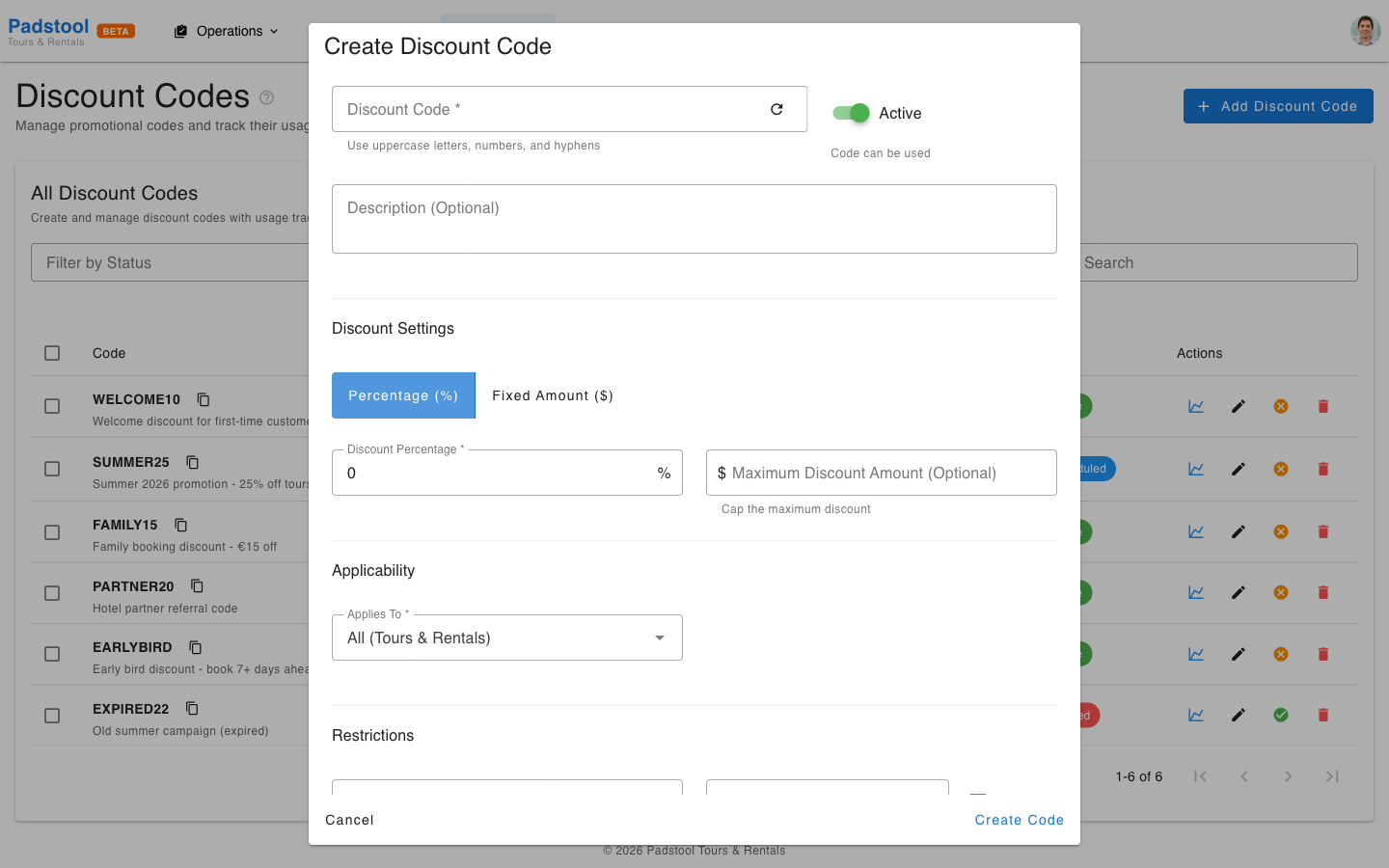
- Fill in the details:
- Code - The text customers will enter (e.g., SUMMER25, WELCOME10). Codes are case-insensitive for customer convenience.
- Description - Internal note explaining the code's purpose.
- Discount type - Percentage or fixed amount.
- Discount value - The amount (percentage number or currency amount).
- Applies to - Whether the code works for tours, rentals, or all bookings.
- Valid from / Valid until - The date range when the code can be used.
- Usage limit - Maximum total number of times this code can be redeemed.
- Per customer limit - Maximum times a single customer can use this code.
- Minimum purchase amount - Optional minimum booking value required to use the code.
- Maximum discount amount - Optional cap on the discount (useful for high-percentage codes on expensive bookings).
- Click Save.
Configuration options explained
| Option | What it does | Example |
|---|---|---|
| Code | Text the customer enters at checkout | SUMMER25 |
| Discount type | Percentage or fixed amount | Percentage |
| Discount value | How much to deduct | 25% |
| Applies to | Tours only, rentals only, or all | Tours |
| Valid from / until | Active date range | June 1 - Aug 31 |
| Usage limit | Total redemptions allowed | 200 |
| Per customer limit | Redemptions per customer | 1 |
| Min purchase amount | Minimum booking value to qualify | €50.00 |
| Max discount amount | Cap on the discount amount | €50.00 |
Real-world examples
Hamburg Bike Tours uses these discount codes:
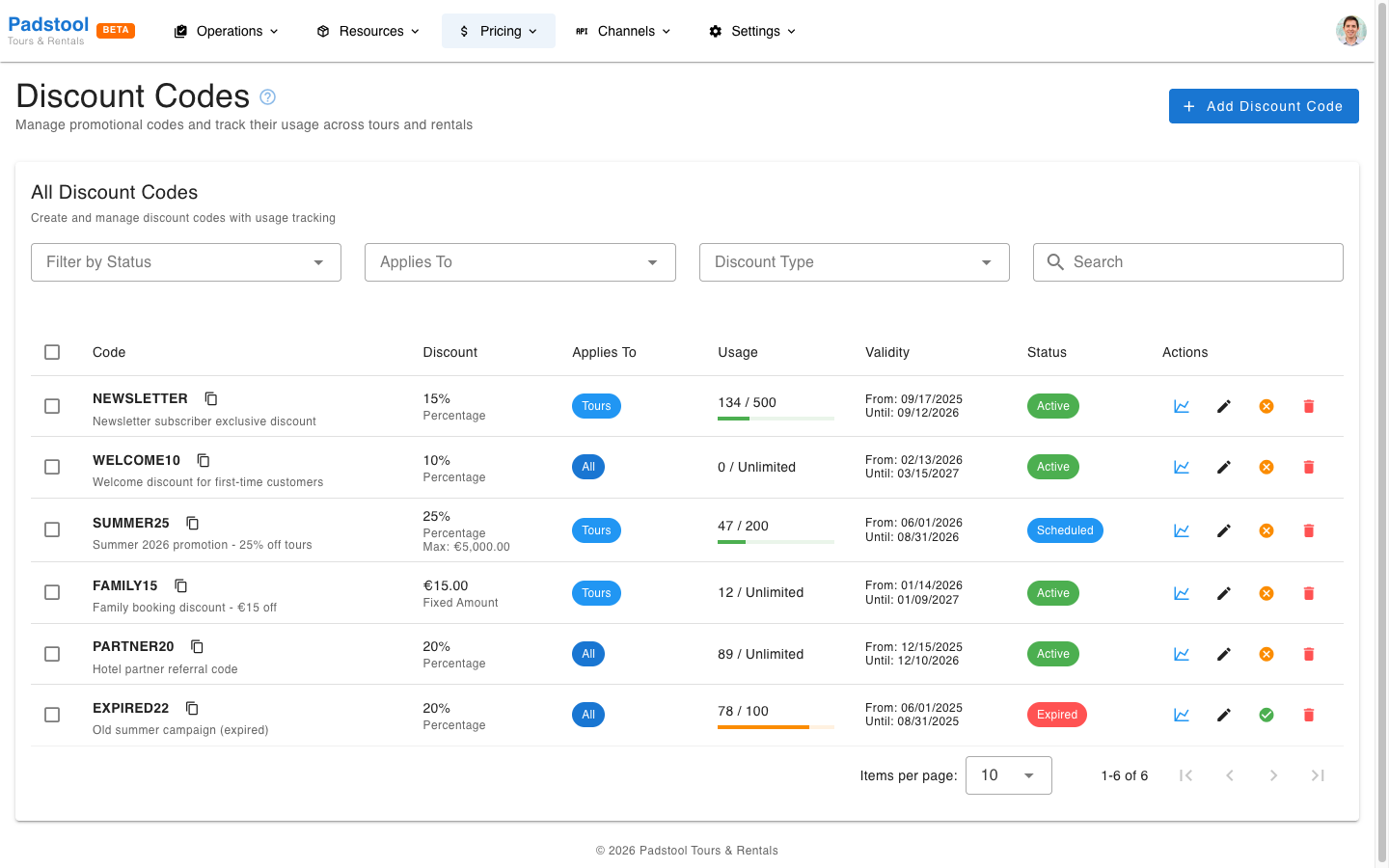
WELCOME10 - First-time customer incentive
- Type: 10% off all bookings
- Limit: 1 use per customer
- Purpose: Encourage first bookings from new customers
SUMMER25 - Seasonal campaign
- Type: 25% off tours
- Valid: June 1 - August 31
- Limit: 200 total uses, max €50.00 discount
- Purpose: Drive summer bookings with a capped discount
FAMILY15 - Family-friendly flat discount
- Type: €15.00 off tours
- Minimum purchase: €50.00
- Purpose: Encourage family bookings with a simple flat discount
PARTNER20 - Hotel referral program
- Type: 20% off all bookings
- Limit: Unlimited uses, no expiry set
- Purpose: Reward referrals from partner hotels
NEWSLETTER - Subscriber reward
- Type: 15% off tours
- Limit: 500 total uses, 2 per customer
- Purpose: Reward newsletter subscribers with an exclusive code shared via email campaigns
Copy and bulk actions
Copy to clipboard
Each discount code in the list has a small copy icon next to it. Click the icon to copy the code to your clipboard for easy sharing with customers or partners.
Bulk actions
Use the checkboxes in the table to select multiple codes, then use the bulk action buttons that appear:
- Activate Selected - Activate all selected codes at once.
- Deactivate Selected - Deactivate all selected codes at once.
This is useful for managing seasonal campaigns where you need to activate or deactivate a batch of codes at the same time.
Tracking usage
The discount codes list shows the current usage count for each code alongside its total limit. This lets you monitor:
- Which codes are popular and driving bookings.
- Which codes are approaching their usage limit.
- Which codes have expired and can be reviewed for effectiveness.
Use the Filter by Status dropdown to view only active, expired, inactive, depleted (usage limit reached), or scheduled (future start date) codes.
Tips
- Use memorable, descriptive codes - SUMMER25 is better than PROMO1.
- Always set an expiration date for campaign codes to prevent long-term revenue loss.
- Set a per-customer limit of 1 for welcome discounts to prevent repeat use.
- Use the maximum discount amount cap on percentage codes for expensive tours to control your margin.
- Monitor usage regularly - if a code reaches its limit quickly, consider whether to increase it or create a new campaign.
- Deactivate codes after campaigns end rather than deleting them, so you retain usage data for analysis.
- Discount codes are applied after seasonal rates and group discounts. See the pricing overview for the full calculation order.
WARNING
Discount codes stack with seasonal rates and group discounts. A customer using a 25% discount code on a tour that already has a 20% summer rate increase and a 10% group discount will receive all three adjustments. Review the final booking total to ensure it meets your margin requirements.