
Appearance
Notification Settings
Notification settings control which email notifications are sent to customers and guides, and when reminders go out.
How to configure notifications
- Navigate to Settings > Notifications.
- Toggle each notification type on or off.
- Configure timing for reminders.
- Click Save Changes.
Use the Enable Email Notifications master toggle at the top to turn all email notifications on or off globally.
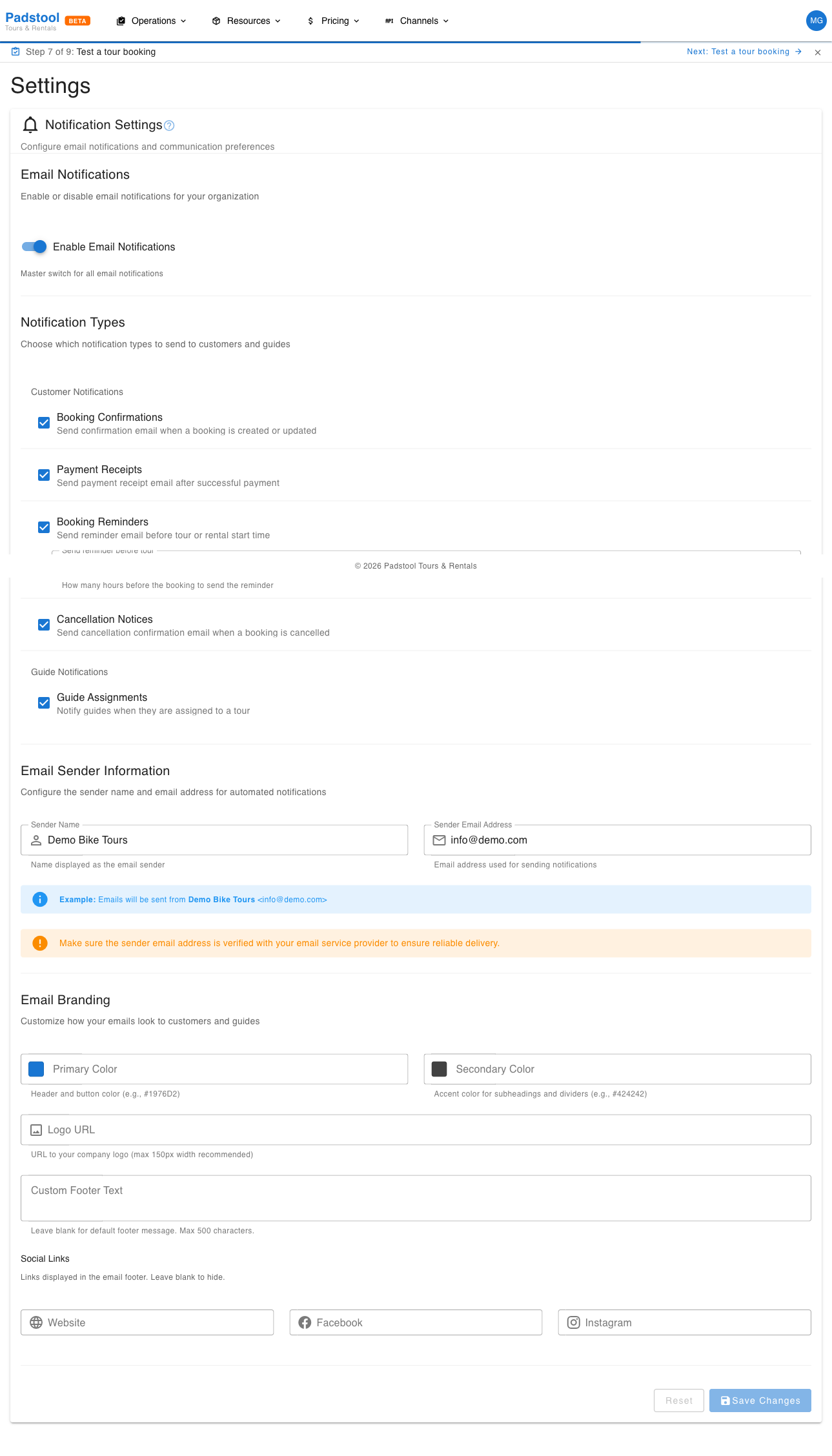
Customer notifications
These emails are sent automatically to customers when events occur:
| Notification | When it is sent | Toggle |
|---|---|---|
| Booking confirmation | Immediately after a booking is confirmed | On/Off |
| Payment receipt | After successful payment processing | On/Off |
| Booking reminder | Before the scheduled tour or rental start time | On/Off |
| Cancellation notice | When a booking is cancelled | On/Off |
Booking reminders
Reminders reduce no-shows by reminding customers about their upcoming booking. Select the reminder timing from a dropdown with fixed options:
| Setting | What it controls | Example |
|---|---|---|
| Reminder timing | Select from a dropdown how far before the booking start time to send the reminder (2, 4, 12, 24, or 48 hours) | 24 hours |
Example: With a 24-hour reminder, a customer with a tour at 10:00 on Saturday receives a reminder email at 10:00 on Friday.
TIP
A 24-hour reminder strikes a good balance - far enough ahead that the customer can prepare, but close enough that the tour is fresh in their mind. Some operators also add a 1-hour reminder for last-minute preparation.
Guide notifications
These emails keep your guides informed about their assignments:
| Notification | When it is sent | Toggle |
|---|---|---|
| Guide assignment | When a guide is assigned to a scheduled tour | On/Off |
Email addresses
Configure the sender and support addresses:
| Setting | What it controls | Example |
|---|---|---|
| Sender name | The name displayed as the sender in customer inboxes | Hamburg Bike Tours |
| Sender email address | Used as the reply-to address when customers respond to notification emails | info@hamburgbiketours.com |
INFO
All notification emails are sent from Padstool's verified email infrastructure. The sender name you configure here is shown to recipients (e.g., "Hamburg Bike Tours"), and the sender email address is set as the reply-to address so that customer replies go directly to your inbox.
Email branding
Customize the look of your notification emails:
| Setting | What it controls | Example |
|---|---|---|
| Primary Color | The main brand color used in email headers and buttons | #1976d2 |
| Secondary Color | Accent color for secondary elements | #424242 |
| Logo URL | Your company logo displayed at the top of emails | https://example.com/logo.png |
| Custom Footer Text | Additional text shown in the email footer | Licensed tour operator since 2015 |
Social links
Add your social media links to the email footer:
| Setting | Example |
|---|---|
| Website | https://hamburgbiketours.com |
| https://facebook.com/hamburgbiketours | |
| https://instagram.com/hamburgbiketours |
What customers see
Each notification email includes:
- Your company name and branding from organization settings.
- Booking details - Tour/rental name, date, time, participant count.
- Pricing summary - Itemized breakdown of the booking cost.
- Contact information - Your support email and phone number for questions.
- Cancellation policy - A reminder of your booking policies.
Tips
- Keep booking confirmations and payment receipts enabled - customers expect these for every transaction.
- Reminders significantly reduce no-shows. The data consistently shows that a 24-hour reminder is the most effective timing.
- Guide assignment notifications ensure guides know about new tours without you having to contact them manually.
- Use a professional sender name that matches your business (e.g., "Hamburg Bike Tours" rather than a personal name).
- Set the sender email address to an inbox that is actively monitored, since customer replies to notification emails will go there.
- Review your notification settings when you update booking policies to ensure the cancellation notice wording remains accurate.
WARNING
Disabling booking confirmation emails is not recommended. Customers rely on the confirmation email as proof of their booking and a reference for tour details.