
Appearance
Group Discounts
Group discounts automatically reduce prices when a booking meets a minimum number of participants, encouraging larger group reservations like corporate events, school trips, and family outings.
How group discount tiers work
You define discount tiers based on participant count. Each tier sets a minimum number of participants and a discount percentage. When a booking is created, the system checks the total participant count and applies the highest qualifying tier.
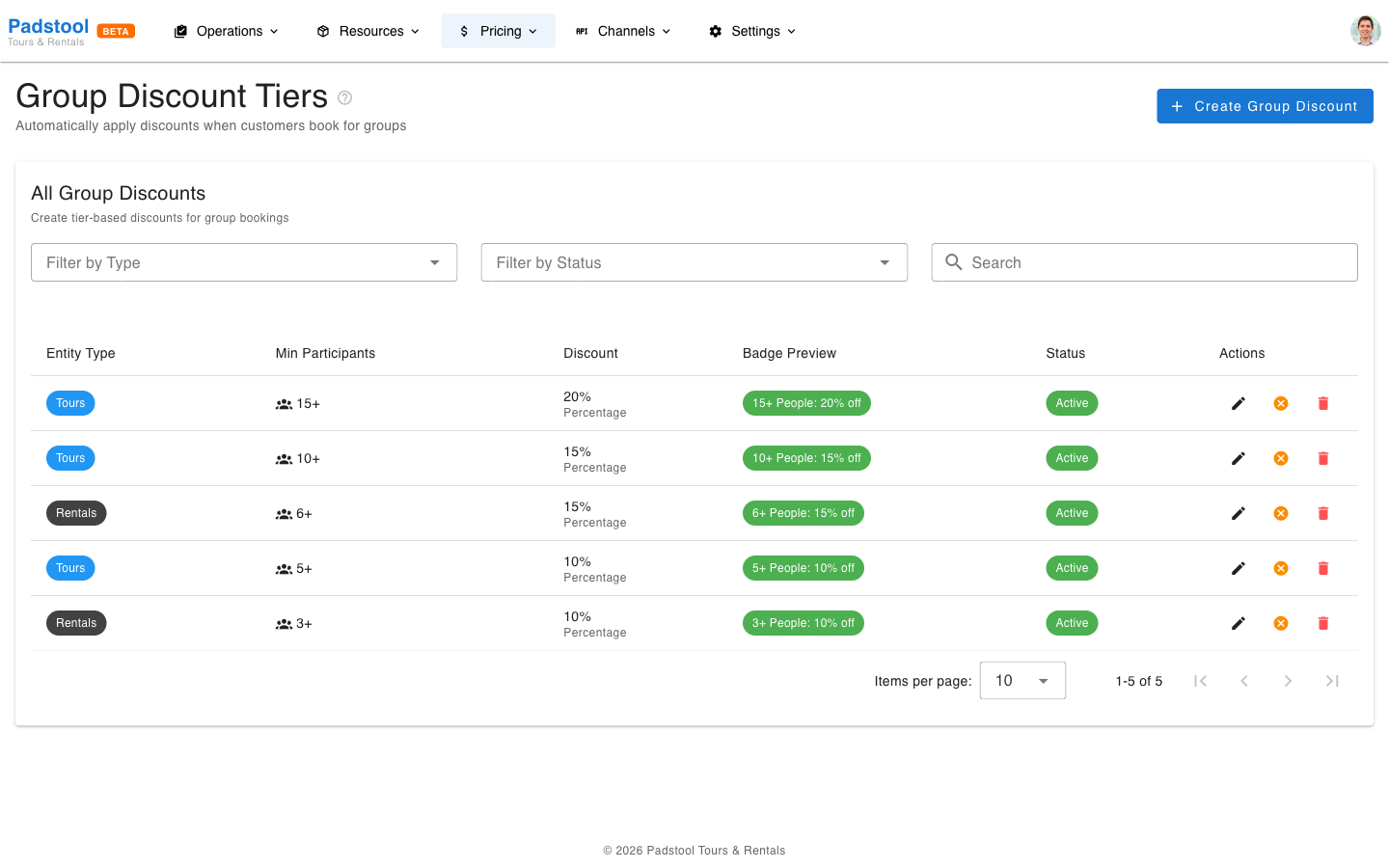
For example, Hamburg Bike Tours has these tour discount tiers:
| Minimum Participants | Discount |
|---|---|
| 5 | 10% off |
| 10 | 15% off |
| 15 | 20% off |
A booking with 8 participants qualifies for the 5-person tier (10% off). A booking with 12 participants qualifies for the 10-person tier (15% off). The system always applies the single best matching tier, not multiple tiers combined.
How to set up group discount tiers
- Navigate to Pricing > Group Discounts.
- Click Create Group Discount.
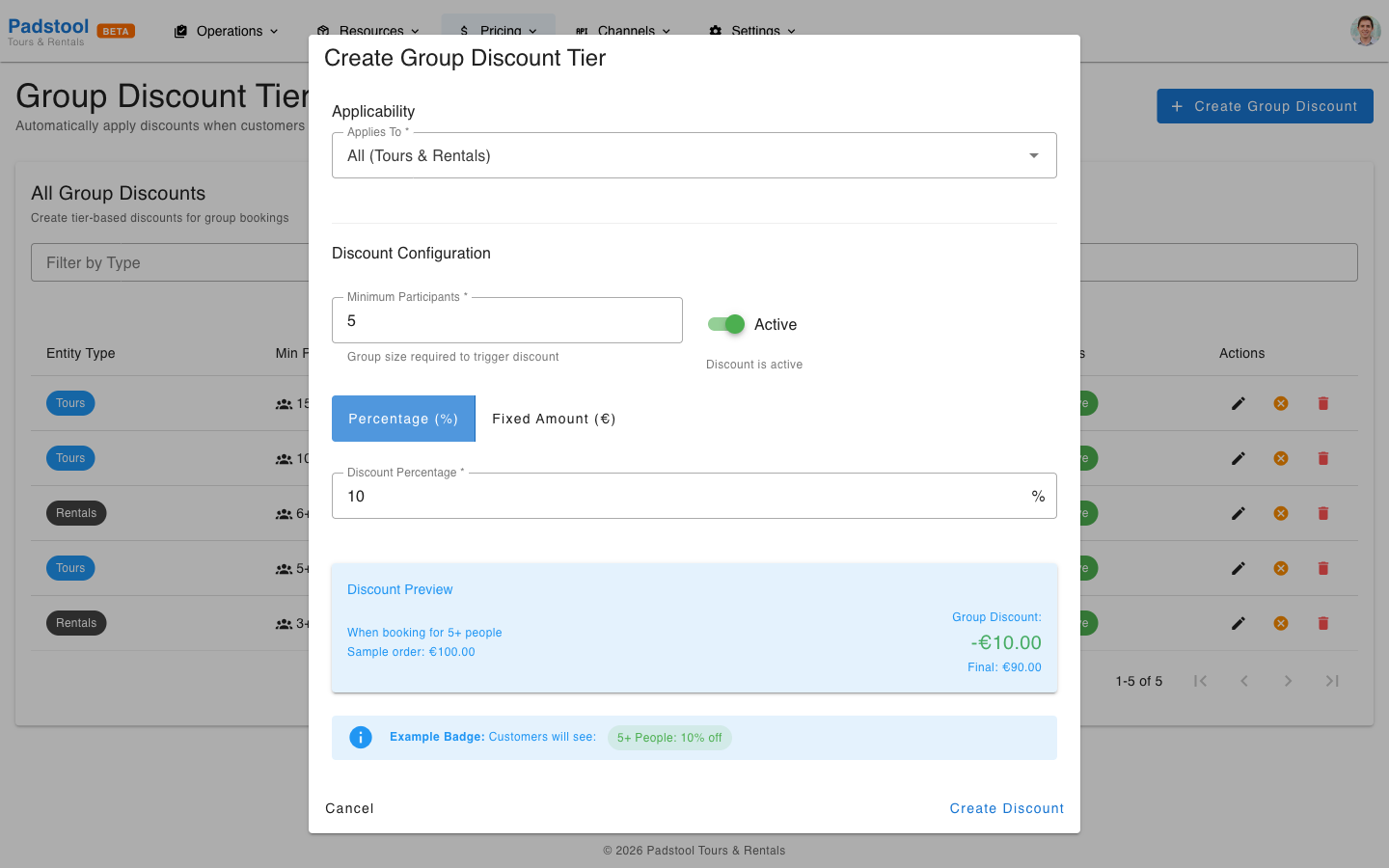
- Fill in the details:
- Entity type - Whether this discount applies to tours, rentals, or all (both).
- Minimum participants - The threshold that triggers this tier.
- Discount type - Percentage discount.
- Discount value - The percentage to deduct (e.g., 10 for 10% off).
- Click Save.
- Repeat for additional tiers.
INFO
You can create separate tiers for tours and rentals. For example, tour group discounts might start at 5 participants, while rental group discounts start at 3.
Calculation examples
Example 1: Tour group booking
Booking: Alster Lakes & Parks tour, 8 adults at €40.00 each.
| Step | Calculation | Amount |
|---|---|---|
| Base price | 8 x €40.00 | €320.00 |
| Group discount (5+ tier, 10%) | €320.00 x 0.10 | -€32.00 |
| Total | €288.00 |
Each participant effectively pays €36.00 instead of €40.00, saving €4.00 per person.
Example 2: Large corporate group
Booking: Speicherstadt Heritage Tour, 16 adults at €35.00 each.
| Step | Calculation | Amount |
|---|---|---|
| Base price | 16 x €35.00 | €560.00 |
| Group discount (15+ tier, 20%) | €560.00 x 0.20 | -€112.00 |
| Total | €448.00 |
Each participant pays €28.00 instead of €35.00, saving €7.00 per person.
Example 3: Group discount with seasonal rate
Discounts stack with other pricing layers. Here is a summer group booking:
Booking: Elbe River Trail, 10 adults at €55.00, booked in July (Summer Peak +20%).
| Step | Calculation | Amount |
|---|---|---|
| Base price | 10 x €55.00 | €550.00 |
| Seasonal rate (+20%) | €550.00 x 1.20 | €660.00 |
| Group discount (10+ tier, 15%) | €660.00 x 0.15 | -€99.00 |
| Total | €561.00 |
The seasonal rate is applied first, then the group discount is calculated on the adjusted amount.
Rental group discounts
You can also configure group discounts for rentals. Hamburg Bike Tours uses:
| Minimum Participants | Discount |
|---|---|
| 3 | 10% off |
| 6 | 15% off |
This encourages families and small groups renting multiple vehicles together.
Managing group discounts
- Edit - Click on any tier in the list to modify the minimum participants or discount value.
- Quick toggle - Each tier has a toggle icon in the Actions column to quickly activate or deactivate it without opening the edit dialog. The icon switches between a check (activate) and a close (deactivate) button.
- Delete - Remove a tier permanently.
- Filter - Use the entity type and status filters to view only tour or rental tiers, or only active/inactive tiers.
Tips
- Start with 2-3 tiers. Too many tiers create marginal differences that are hard for customers to understand.
- Set the first tier at a level that genuinely qualifies as a "group" for your business - 5 participants works well for most tour operators.
- Group discounts apply to the per-person base price (after seasonal adjustment) but before add-ons. Add-ons are always charged at full price.
- Consider your tour capacity when setting thresholds. If your largest tour fits 16 people, a 20-person tier will never trigger.
- Promote group rates on your website and to corporate clients - they are a strong incentive for larger bookings.
TIP
Group discounts are calculated automatically at checkout. Customers see the discount reflected in their total without needing to enter a code. See the pricing overview for how group discounts fit into the full calculation.