
Appearance
Pricing Overview
The pricing engine calculates the final cost of every booking by combining multiple pricing layers - base prices, seasonal adjustments, group discounts, promo codes, and add-ons.
How pricing layers work together
When a customer books a tour or rental, the system applies each pricing layer in order:
Base Price (per price type: Adult, Child, Senior)
    ↓ adjusted by
Seasonal Rate (if the booking date falls within a configured date range)
    ↓ reduced by
Group Discount (if participant count meets a tier threshold)
    ↓ reduced by
Discount Code (if a valid promo code is entered)
    ↓ plus
Add-ons (optional or required extras)
    = Booking Total
Each layer is optional. If you have not configured seasonal rates or group discounts, those steps are simply skipped and the base price passes through unchanged.
Example walkthrough
Here is a concrete example using Hamburg Bike Tours data to show how each layer applies.
Booking details: Speicherstadt Heritage Tour, 6 adults, booked for July 15.
| Step | Calculation | Amount |
|---|---|---|
| Base price | 6 adults x €35.00 | €210.00 |
| Seasonal rate | Summer Peak (+20%) | €252.00 |
| Group discount | 5-9 participants tier (-10%) | €226.80 |
| Discount code | FAMILY15 (€15.00 off) | €211.80 |
| Add-on | Photo Package (€15.00 per booking) | €226.80 |
| Booking total | €226.80 |
Step by step:
- Base price - Each adult pays the standard tour price of €35.00. Six adults cost €210.00.
- Seasonal rate - July 15 falls within the Summer Peak season (June 1 - August 31), which adds 20%. The subtotal becomes €252.00.
- Group discount - With 6 participants, the booking qualifies for the 5-9 person tier at 10% off. The subtotal drops to €226.80.
- Discount code - The customer enters FAMILY15 at checkout, which takes a flat €15.00 off. The subtotal is now €211.80.
- Add-on - The customer selects the optional Photo Package at €15.00 per booking. The final total is €226.80.
Price types
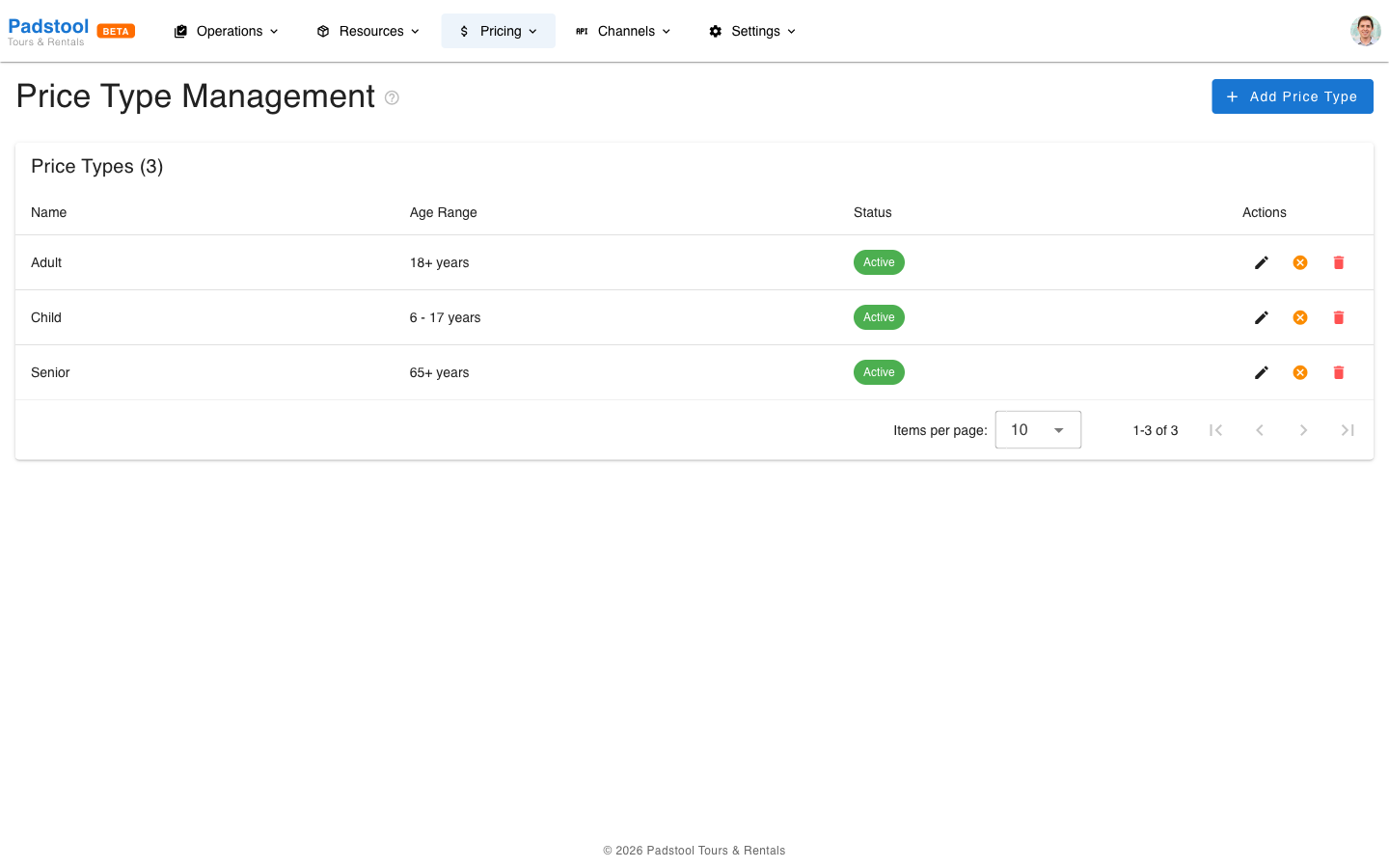
Price types define the customer segments you offer, such as Adult, Child, and Senior. Each price type has its own base price for every tour.
For example, Hamburg Bike Tours uses:
| Price Type | Description | Age Range |
|---|---|---|
| Adult | Ages 18 and up | 18+ |
| Child | Ages 6-17 | 6-17 |
| Senior | Ages 65 and up | 65+ |
Child tickets are typically set at 60% of the adult price, and senior tickets at 80%, but you can set any price you like per tour.
To manage price types, navigate to Pricing > Price Types.
Recommended setup order
If you are setting up pricing for the first time, follow this order:
- Price types - Define your customer segments (Adult, Child, Senior). These are required before you can set tour prices.
- Seasonal rates - Configure date-based adjustments for peak and off-peak seasons.
- Group discounts - Set up tier-based discounts to encourage larger bookings.
- Discount codes - Create promo codes for marketing campaigns and partnerships.
- Add-ons - Define optional and required extras like helmets, lunch stops, or photo packages.
Where pricing appears
- Booking widget - Customers see the calculated total including all applicable layers when they book online.
- Manual bookings - Operators see the same calculated pricing when creating a booking on behalf of a customer.
- OTA channels - Bookings from online travel agencies (Baja Bikes, Get Your Guide, Viator, etc.) go through the same pricing engine via the OCTO API. Prices shown to OTA customers reflect your base prices, seasonal rates, and tour option pricing automatically.
- Booking details - The full pricing breakdown is stored with each booking for audit and reference.
TIP
You can test your pricing setup by creating a booking in the target date range and verifying the total matches your expectations. The pricing engine shows a complete breakdown on every booking.