
Appearance
Booking Policies
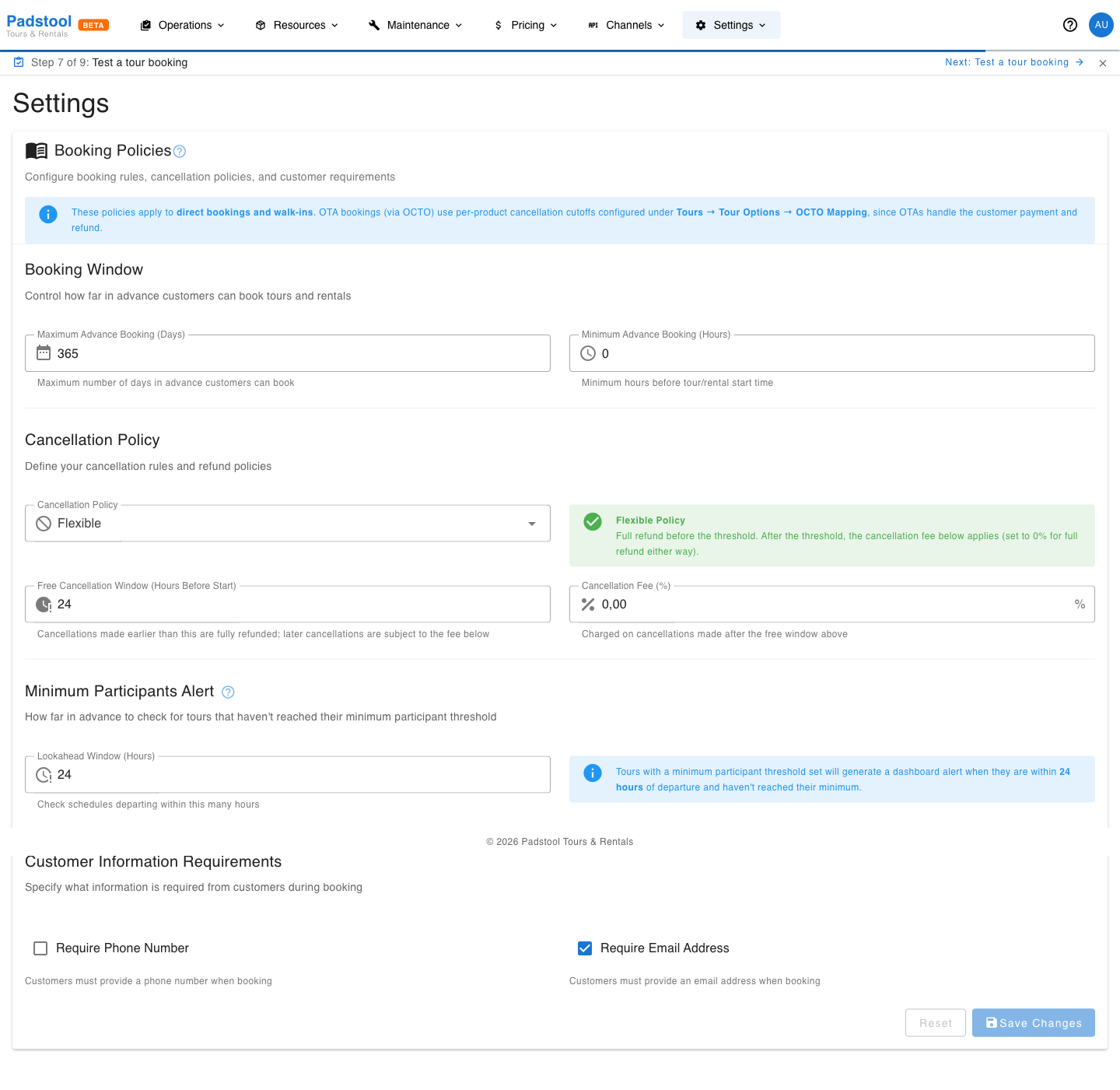
Booking policies define the rules that govern how bookings are created and cancelled - from how far in advance customers can book to how refunds are handled when they cancel.
Scope
These settings apply to direct bookings and walk-ins. Bookings that come in through OTA channels (via the OCTO API) use per-product cancellation cutoffs configured under Tours → the relevant tour option → OCTO Mapping. OTAs handle the customer payment and refund themselves, which is why their cutoffs are configured separately.
How to configure policies
- Navigate to Settings > Booking Policies.
- Adjust the policy settings as needed.
- Click Save Changes.
Booking window
Control how far in advance customers can book and how close to the start time they can still place a booking:
| Setting | What it controls | Example |
|---|---|---|
| Maximum Advance Booking (Days) | The furthest into the future a customer can book | 365 days |
| Minimum Advance Booking (Hours) | How close to the start time bookings are still accepted (0 allows same-day / on-the-day bookings) | 0 hours |
Example: A tour operator who accepts walk-ins right up until departure sets the minimum to 0. An operator who needs an hour to prep gear and confirm guides sets it to 1.
Cancellation policy
The cancellation policy combines three settings: a policy mode, a free cancellation window, and a cancellation fee. Together they define what a customer gets refunded depending on when they cancel.
Policy modes
| Mode | Behaviour |
|---|---|
| Flexible | Full refund before the threshold; full refund after as well (set fee to 0%). |
| Moderate | Full refund before the threshold; partial refund after (cancellation fee is deducted). |
| Strict | Full refund before the threshold; no refund after (set fee to 100%). |
| Non-refundable | Cancellations are not allowed at any point. |
Threshold and fee
| Setting | What it controls | Example |
|---|---|---|
| Free Cancellation Window (Hours Before Start) | Cancellations made earlier than this are fully refunded | 48 hours |
| Cancellation Fee (%) | Charged on cancellations made after the free window above | 50% |
How they work together
The threshold is a free-cancellation cutoff, not a hard deadline. Customers can still cancel after it; the configured fee is deducted from their refund instead.
Example: A booking total of 80€ with a 48-hour window and a 50% fee:
- Customer cancels 60 hours before start → full 80€ refund.
- Customer cancels 12 hours before start → 40€ refund (50% fee deducted).
- If the policy is set to Non-refundable, the cancellation is rejected outright and no refund is issued.
The threshold and fee inputs are disabled when the policy is set to Non-refundable, since they have no effect in that mode.
Customer requirements
| Setting | What it controls | Example |
|---|---|---|
| Require Email Address | Email must be provided at booking | Yes |
| Require Phone Number | Phone number must be provided at booking | Yes |
These ensure you have the contact information needed to send confirmations, reminders, and handle any issues.
Minimum participants alert
Configure how far in advance the system checks for tours that haven't reached their minimum participant threshold:
| Setting | What it controls | Example |
|---|---|---|
| Lookahead Window (Hours) | How many hours before departure to start alerting about low participant counts | 24 hours |
When a scheduled tour has fewer bookings than its minimum participants threshold within the lookahead window, a dashboard alert is created so you can decide whether to cancel, reschedule, or consolidate.
How policies affect the booking widget
Your booking policies are enforced automatically in the customer-facing booking widget:
- Dates beyond the maximum advance booking window are greyed out.
- Times within the minimum advance booking window are blocked (set to 0 to allow same-day bookings up to the start time).
- Cancellation terms are displayed during checkout so customers know the policy before they pay.
- Customer email and phone requirements are enforced in the booking form.
Tips
- If you accept walk-ins on the day, set Minimum Advance Booking to
0. - Use Flexible while you're starting out: it's the easiest for customers to commit to. Tighten to Moderate with a small fee once you have enough volume to absorb late cancellations confidently.
- Requiring a phone number is recommended so you can contact customers about last-minute changes or weather-related cancellations.
- The cancellation fee % only matters in Moderate / Strict modes. In Flexible it's ignored (always full refund); in Non-refundable cancellations are blocked outright.
WARNING
Changes to booking policies apply to new cancellations only. A booking cancelled today uses the policy that's in effect today, not the one that was in place when the booking was originally made.